
How to localize the credential picker for the DC API on Android
Translate the credential title, subtitle, and claim labels that Android shows in the DC API credential picker, and add labels for claims the Holder SDK does not recognize.
Digital Credentials (DC) API support is currently offered as a tech preview. The DC API specification itself is still under active development in the W3C Web Incubator CG, and platform implementations continue to evolve. As such, functionality may be limited, may not work in all scenarios, and could change or break without prior notice as browsers and operating systems update their implementations.
Overview
When a website requests a credential over the DC API, Android draws the credential picker that asks the user to confirm what they are about to share. Your application does not render that screen, so it has no opportunity to format the text on it while the request is in flight. Instead, the Holder SDK hands the operating system everything the picker needs at the point where it registers your credentials, and the operating system renders that content later.
Three pieces of text on that screen come from your application: the credential title, the credential subtitle, and the label shown for each requested claim. All three are supplied through Android's resource system, which means you localize them the same way you localize any other string in your application.
Everything else on the screen belongs to the operating system and the browser, including the heading, the confirmation buttons, and the site name. Android and the browser localize those for you.
This guide assumes you have already built an Android application that supports the DC API, as described in How to build an Android application that can present a credential via the DC API.
What the picker shows
The title and subtitle appear at the top of the credential card:

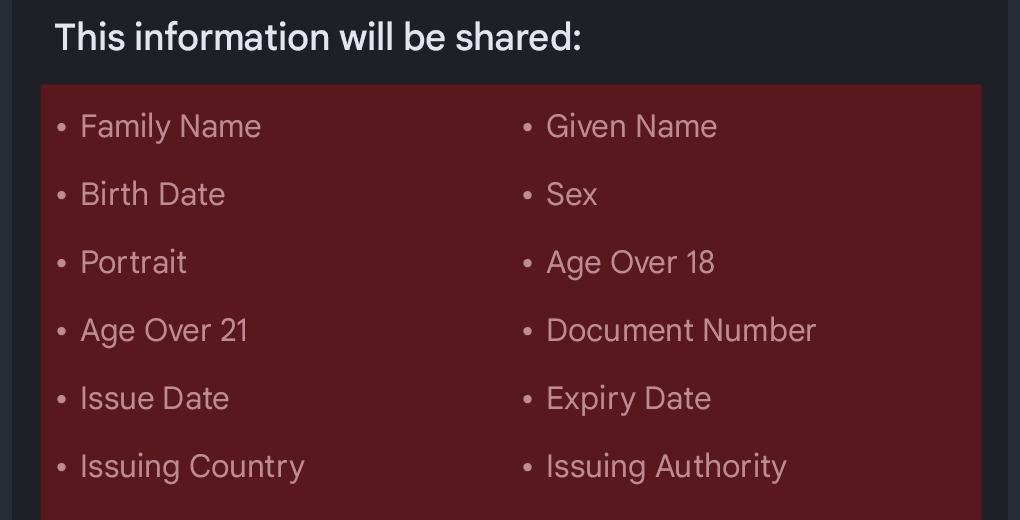
The claims the verifier asked for are listed below the card, each one rendered with its label:
How it works
The SDK builds the picker content from four string resources that your application can override:
| Resource | Type | Purpose |
|---|---|---|
global_mattr_dcm_credential_default_title | string | Fallback title for the credential card. |
global_mattr_dcm_credential_default_subtitle | string | Subtitle for the credential card. Defaults to Credential. |
global_mattr_dcm_string_table_keys | string-array | The claims that have a label, each identified as <namespace>:<element>. |
global_mattr_dcm_string_table_values | string-array | The label for each claim, in the same order as the keys. |
How the title is chosen
The SDK uses the first of these that is available:
- The credential's own branding name, as supplied by the issuer.
- The value of
global_mattr_dcm_credential_default_title. - Your application's name, as declared in your manifest.
Most credentials carry a branding name, so in practice the title resource is a fallback for credentials that do not. The branding name comes from the credential itself, so it is not something you can translate through Android resources.
How claim labels are chosen
The two string arrays form a lookup table. The SDK pairs them by position, so the first key matches the first value, the second key matches the second value, and so on. Each key is the namespace and the element identifier of a claim, joined by a colon, for example org.iso.18013.5.1:family_name.
If a requested claim has no entry in the table, the SDK falls back to formatting the element identifier: it drops the namespace, replaces underscores with spaces, and capitalizes each word. The claim family_name becomes Family Name. This is a mechanical rewrite of the identifier rather than a translation, so it produces the same text no matter which language is active. Any claim you expect to present should have a real label.
When the values are read
Android resolves resources against the active locale, and the SDK reads them when it registers credentials. The language shown in the picker is therefore the language that was active the last time registration ran. The SDK registers credentials when:
- You initialize the SDK with the DC API enabled.
- A credential is added.
- A credential is deleted.
- The device language changes. The SDK listens for this and re-registers your credentials automatically, so a user who switches their phone to another language sees the picker in that language without reopening your application.
Only a language change made in the Android system settings triggers that automatic re-registration. If your application offers its own in-application language setting, the picker keeps the labels registered under the previous language until credentials are registered again. Adding or removing a credential, or reinitializing the SDK, brings the picker back in step.
Where you do offer an in-application language setting, use Android's per-app language preferences rather than a custom mechanism. Declaring a locales_config file and setting the locale through AppCompatDelegate.setApplicationLocales() keeps your application's language selection consistent with the rest of the system, and it means the picker resources resolve against the same locale your own screens use the next time credentials are registered.
Localizing the picker
Override the credential title and subtitle
Declare the two string resources in your own application. Android resource merging means a resource your application declares takes precedence over the one the SDK ships, so no SDK configuration is involved.
<resources>
    <string name="global_mattr_dcm_credential_default_title">Example Wallet</string>
    <string name="global_mattr_dcm_credential_default_subtitle">Credential</string>
</resources>
Then add a translation for each language you support, in the matching resource folder:
<resources>
    <string name="global_mattr_dcm_credential_default_title">Portefeuille Exemple</string>
    <string name="global_mattr_dcm_credential_default_subtitle">Justificatif</string>
</resources>
Leave global_mattr_dcm_credential_default_title out of your resources
entirely if you want the picker to fall back to your application name, which
Android already localizes through your manifest.
Translate the claim labels
The SDK ships English labels for the static claims in the org.iso.18013.5.1 namespace defined in ISO/IEC 18013-5:2021. To translate them, declare both string arrays in your application.
Two rules matter here:
- String arrays are replaced, not merged. The moment your application declares
global_mattr_dcm_string_table_keys, the array the SDK ships is no longer used. Your array has to be the complete set of claims you want labeled, including the ISO ones. - The two arrays are paired by position. They must contain the same number of items, in the same order, in every resource folder.
Because Android resolves each resource independently, you only need to declare the keys once, in your default resource folder. Every translation then overrides the values array alone, which keeps claim identifiers out of your translation workflow. Never translate the keys themselves. A translated key no longer matches the requested claim, so the label falls back silently rather than failing.
Start from the SDK's default set, which you can copy as is:
<string-array name="global_mattr_dcm_string_table_keys">
    <item>org.iso.18013.5.1:family_name</item>
    <item>org.iso.18013.5.1:given_name</item>
    <item>org.iso.18013.5.1:birth_date</item>
    <item>org.iso.18013.5.1:issue_date</item>
    <item>org.iso.18013.5.1:expiry_date</item>
    <item>org.iso.18013.5.1:issuing_country</item>
    <item>org.iso.18013.5.1:issuing_authority</item>
    <item>org.iso.18013.5.1:document_number</item>
    <item>org.iso.18013.5.1:portrait</item>
    <item>org.iso.18013.5.1:driving_privileges</item>
    <item>org.iso.18013.5.1:un_distinguishing_sign</item>
    <item>org.iso.18013.5.1:administrative_number</item>
    <item>org.iso.18013.5.1:sex</item>
    <item>org.iso.18013.5.1:height</item>
    <item>org.iso.18013.5.1:weight</item>
    <item>org.iso.18013.5.1:eye_colour</item>
    <item>org.iso.18013.5.1:hair_colour</item>
    <item>org.iso.18013.5.1:birth_place</item>
    <item>org.iso.18013.5.1:resident_address</item>
    <item>org.iso.18013.5.1:portrait_capture_date</item>
    <item>org.iso.18013.5.1:age_in_years</item>
    <item>org.iso.18013.5.1:age_birth_year</item>
    <item>org.iso.18013.5.1:issuing_jurisdiction</item>
    <item>org.iso.18013.5.1:nationality</item>
    <item>org.iso.18013.5.1:resident_city</item>
    <item>org.iso.18013.5.1:resident_state</item>
    <item>org.iso.18013.5.1:resident_postal_code</item>
    <item>org.iso.18013.5.1:resident_country</item>
    <item>org.iso.18013.5.1:family_name_national_character</item>
    <item>org.iso.18013.5.1:given_name_national_character</item>
    <item>org.iso.18013.5.1:signature_usual_mark</item>
</string-array>

<string-array name="global_mattr_dcm_string_table_values">
    <item>Family Name</item>
    <item>Given Name</item>
    <item>Birth Date</item>
    <item>Issue Date</item>
    <item>Expiry Date</item>
    <item>Issuing Country</item>
    <item>Issuing Authority</item>
    <item>Document Number</item>
    <item>Portrait</item>
    <item>Driving Privileges</item>
    <item>Distinguishing Sign</item>
    <item>Administrative Number</item>
    <item>Sex</item>
    <item>Height</item>
    <item>Weight</item>
    <item>Eye Color</item>
    <item>Hair Color</item>
    <item>Birth Place</item>
    <item>Resident Address</item>
    <item>Portrait Capture Date</item>
    <item>Age In Years</item>
    <item>Birth Year</item>
    <item>Issuing Jurisdiction</item>
    <item>Nationality</item>
    <item>Resident City</item>
    <item>Resident State</item>
    <item>Resident Postal Code</item>
    <item>Resident Country</item>
    <item>Family Name</item>
    <item>Given Name</item>
    <item>Signature</item>
</string-array>
In each translated resource folder, declare only the values array, with one item per key and in the same order:
<string-array name="global_mattr_dcm_string_table_values">
    <item>Nom de famille</item>
    <item>Prénom</item>
    <item>Date de naissance</item>
    <!-- One item per key, in the same order as the keys array. -->
</string-array>
If the values array is shorter than the keys array in any language, credential registration fails for that language. The SDK logs the failure rather than throwing, so the symptom you see is that your credentials stop appearing in the picker rather than a crash. Keep the two arrays the same length in every resource folder, and check your logs for DC API registration errors when a credential goes missing.
Add labels for claims the SDK does not recognize
The default table covers the static claims in the org.iso.18013.5.1 namespace. If you hold credentials that carry claims from another namespace, add them to the table yourself. For example, mDLs issued in the United States often carry claims in the AAMVA namespace:
<string-array name="global_mattr_dcm_string_table_keys">
    <!-- The ISO/IEC 18013-5 claims from the previous step, then: -->
    <item>org.iso.18013.5.1.aamva:domestic_driving_privileges</item>
    <item>org.iso.18013.5.1.aamva:DHS_compliance</item>
    <item>org.iso.18013.5.1.aamva:EDL_credential</item>
    <item>org.iso.18013.5.1.aamva:given_name_truncation</item>
</string-array>

<string-array name="global_mattr_dcm_string_table_values">
    <!-- The matching labels from the previous step, then: -->
    <item>Domestic Driving Privileges</item>
    <item>DHS Compliance</item>
    <item>Enhanced Driver License</item>
    <item>Given Name Truncation</item>
</string-array>
The same approach covers claims whose element identifier carries a value, such as the age_over_NN age attestations. The SDK does not ship labels for these, because the set of possible values is open ended, so they go through the fallback formatter and render as Age Over 18, Age Over 21, and so on. Add an explicit entry for each age you expect to present:
<string-array name="global_mattr_dcm_string_table_keys">
    <item>org.iso.18013.5.1:age_over_18</item>
    <item>org.iso.18013.5.1:age_over_21</item>
</string-array>

<string-array name="global_mattr_dcm_string_table_values">
    <item>Age Over 18</item>
    <item>Age Over 21</item>
</string-array>
Any age you do not enumerate still falls back to the formatted element identifier, which reads acceptably in English and incorrectly in most other languages. The same applies to the biometric_template_xx claims.
Test the picker in each language
- Install your application on an Android device running Android 14 or later, and claim a credential as described in the Claim a credential tutorial.
- Change the device language in the Android system settings to one of the languages you added.
- Use a browser on the device to navigate to the MATTR Labs remote presentation testing tool.
- Select Digital Credentials API from the Select Experience list, then select Request credentials.
- Confirm that the credential card and the claim list in the picker are shown in the language you selected.
- Repeat for each language you support.
If the picker still shows the previous language, your credentials were not re-registered. Confirm that the device language was changed at the system level rather than inside your application, and check your logs for DC API registration errors.
What's next?
- Build the web application that requests credentials from your wallet over the DC API.
- Review the DC API overview for how the credential picker differs between iOS and Android.
- Check the SDK reference documentation for the full set of available functions and classes.
How would you rate this page?
Last updated on