
Overview
Learn how Wallet Attestation works in MATTR Holder SDKs to enable credential claiming from issuers that require trusted wallet applications.
Overview
Wallet Attestation lets your holder application prove it is a trusted, verified wallet so that issuers who require it will release credentials to you. When an issuer requires Wallet Attestation, your application must cryptographically prove its authenticity before it can claim credentials.
Your wallet is identified to issuers using a client identifier (clientId) you agree on with each issuer, which lets them recognise your wallet as an approved, trusted origin on their curated list. The Holder SDK automatically generates, manages, and presents the Wallet Attestation proof whenever a credential request occurs, so supporting this capability adds no extra code to your claiming flow and no extra friction for your users. Everything happens in the background, and credential claiming looks and feels the same as before. The main work is the one-time coordination with each issuer to establish trust, described in How to set up Wallet Attestation.
This mechanism is valuable when:
- Enforcing wallet policies: Issuers can ensure that only authorized and trusted wallet applications receive their credentials.
- Protecting against unauthorized access: Credential theft is prevented by verifying the wallet's identity before issuance.
- Leveraging platform-based attestation: Platform-specific security mechanisms (such as iOS App Attestation and Android Key Attestation) are used to authenticate app instances with the MATTR VII tenant, ensuring that only trusted wallet instances receive attestation proofs for use with issuers.
Wallet Attestation is available from the following SDK versions:
- iOS Holder SDK: 6.0.0
- Android Holder SDK: 7.0.0
- React Native Holder SDK: 10.0.0
It also requires an SDK Backend, so you must initialize the SDK with a platform configuration. Without one, the SDK does not connect to a backend and Wallet Attestation is unavailable.
For a detailed technical breakdown of Wallet Attestation from an issuer's perspective, including attestation modes, JWT structures, and certificate trust chains, see Wallet Attestation in the Issuance documentation.
What this means for your team
Supporting Wallet Attestation in your wallet involves more than just the integration code:
- For policy makers: Wallet Attestation is how issuers decide which wallet applications can receive their credentials. Establishing your wallet as a recognised, trusted application, through the root certificate you share and the client identifier you agree on, is what gets your users' credentials released by issuers that enforce these rules.
- For product managers and designers: Your existing claiming flows and user experiences stay the same. Attestation proofs are securely generated and presented in the background, so users gain the trust benefits without any added friction or change to how they claim credentials.
- For solution architects: Integrate the Holder SDK with your MATTR VII tenant and wallet identity. Securely manage identities and cryptographic keys, and design for multi-tenant separation, high availability, observability, error handling, and monitoring of attestation outcomes.
Standards and specifications
Wallet Attestation in MATTR VII is based on the following standards:
- OAuth 2.0 Attestation-Based Client Authentication: The core specification for Wallet Attestation
- RFC 9449: DPoP (Demonstrating Proof-of-Possession): DPoP specification
How it works
At a high level, getting your wallet recognised and claiming credentials from an issuer that requires Wallet Attestation involves four steps:
- Share and onboard the root certificate: You create a Holder root CA certificate on your MATTR VII tenant. This is your Wallet Attestation root, and you share it with the issuer, who onboards it as the trust anchor for your wallet application. This is a one-time, out-of-band setup per issuer.
- Configure and operate: The issuer configures their issuance flows to require Wallet Attestation for your wallet, registered against the client identifier you agree on.
- Retrieve a credential as usual: When a user claims a credential, the Holder SDK automatically obtains or refreshes a Wallet Attestation proof, bound to that specific wallet instance, and sends it to the issuer as part of the standard credential retrieval flow.
- Verify and issue: The issuer validates the proof against your onboarded root CA certificate. If it is valid and your wallet is approved, the credential is issued and stored in the app. Otherwise the SDK surfaces an error.
Steps 1 and 2 are the one-time coordination covered in How to set up Wallet Attestation. Steps 3 and 4 are handled automatically by the SDK at claim time and require no additional code from you. The rest of this section explains the underlying interaction in detail.
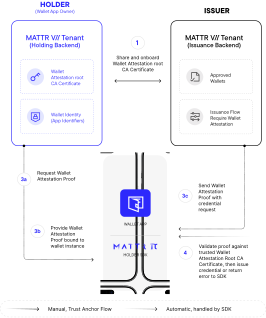
The following diagram illustrates the interaction between the Holder SDK, the MATTR VII tenant, and the issuer.
At the protocol level, the Wallet Attestation proof is carried as an OAuth client attestation JWT (defined in OAuth 2.0 Attestation-Based Client Authentication) combined with a DPoP proof. In the descriptions below, "client attestation JWT" refers to the token that conveys the Wallet Attestation to the issuer.
- Retrieve the credential offer: The Holder SDK retrieves the credential offer from the issuer. This offer includes a reference to the issuer's metadata endpoint.
- Check issuer metadata for attestation requirements: The Holder SDK fetches the issuer's metadata. If the metadata specifies that the issuer requires Wallet Attestation to issue credentials, the SDK proceeds with the attestation flow. If not, credential claiming continues without attestation.
- Request a Wallet Attestation token from your backend MATTR VII tenant: The Holder SDK automatically makes a request to the backend MATTR VII tenant it is connected to, passing the identifiers of the Holder Application configuration that were declared during SDK initialization.
- The MATTR VII tenant validates and returns the Wallet Attestation token: The MATTR VII tenant recognizes the app as a registered instance of the configured Holder Application. Assuming the SDK Backend is correctly set up, the tenant returns a signed client attestation JWT that carries the Wallet Attestation proof.
- Generate a DPoP proof and present attestation to the issuer: The Holder SDK generates a DPoP proof locally and includes both the client attestation JWT and the DPoP proof when requesting the credential from the issuer. Together these two values form the complete Wallet Attestation presented to the issuer. No additional code is required from the holder application developer.
- Issuer validates and issues the credential: The issuer validates the Wallet Attestation (client attestation JWT + DPoP proof), confirms that all requirements are met, and issues the credential to the holder application.
Understanding issuer requirements
Whether an issuer requires Wallet Attestation from your wallet depends on how they have configured their trusted wallets, not just on what their public metadata advertises.
- Issuer metadata (the OID4VCI
.well-knownendpoint) declares which authentication methods the issuer supports at a tenant level. For example, the issuer may advertise bothattest_jwt_client_auth_dpopandnoneas supported methods. - Per-client configuration determines what is required for any specific wallet. The issuer configures this in their trusted wallet list, associating a client identifier with a specific authentication method.
Your wallet cannot determine from public metadata alone whether Wallet Attestation is required for your specific wallet application. The issuer communicates this requirement to you as part of the onboarding process. In practice:
- If the issuer has configured your application with Wallet Attestation required, the SDK must present a valid attestation proof or credential claiming will fail.
- If the issuer has configured your application without Wallet Attestation, the SDK may still send an attestation proof (if it detects attestation support in the issuer metadata), and the issuer will simply ignore it.
- If the issuer does not support Wallet Attestation at all (not advertised in metadata), the SDK does not send an attestation proof.
Next
Ready to enable Wallet Attestation? Follow How to set up Wallet Attestation to configure the SDK Backend, create a Holder root CA certificate, and coordinate with each issuer.
How would you rate this page?
Last updated on