
Credential Verification
Mobile documents (mDocs) are the emerging standard for high-assurance digital credentials. Mobile driver's licenses (mDLs) are the most prominent and most adopted example to date, but the same verification capabilities apply to any high-assurance credential built on the mDoc family of standards, including national identity cards, residence permits, professional licenses, and other credentials beyond the driver's license.
As an implementer, you need a verification solution that handles the complexity of standards compliance, trust establishment, and cross-platform support, without requiring deep cryptographic expertise. This overview walks you through the key decisions and steps for adding mDoc verification to your application, whether you're verifying in person at a counter, remotely through a website, or within a native mobile app. Start here, then follow the pages in order or jump to the topic you need.
How mDoc verification works
An mDoc is a digital credential stored in a holder's wallet, issued by a trusted authority. Unlike traditional document scans or OCR (optical character recognition)-based checks, mDoc verification is cryptographic: your application validates a digitally signed credential against a trusted issuer's certificate chain.
A complete verification covers both identity and information assurance:
- Identity assurance: resolve the issuer's identifier and confirm the credential was signed by a trusted issuer, typically by checking the issuer's certificate against a local trust list or an external trust registry.
- Information assurance: verify the digital signature to confirm integrity, validate the credential format against its referenced specification, and check that the credential is currently active (not expired or revoked).
Verifying a credential does not include evaluating the truth of the claims encoded in the credential. Verification confirms only that these are the same claims signed by the issuer and that the credential has not been tampered with.
In practice, this means:
- No visual inspection required: Verification is automated and tamper-evident.
- Selective disclosure: Holders share only the data points you request (e.g., "over 18" without revealing full date of birth). See selective disclosure for the underlying mechanism.
- Offline capable: In-person verification can work without network connectivity.
- Standards-based: Built on ISO/IEC 18013-5, 18013-7 and 23220, ensuring interoperability across wallets and issuers.
Choose your verification channel
The channel is your first and most important decision. It determines which SDK you integrate, the protocols involved, and the user experience. Pick the one that matches where verification happens.
In-person verification
Proximity checks at a counter or kiosk using BLE or NFC, based on ISO/IEC 18013-5. Works offline.
Remote verification
Verify over the internet with no physical presence, based on ISO/IEC 18013-7 and OID4VP. Choose a web app or mobile app channel.
Remote verification splits into two channels. Start from the remote verification overview to decide between them:
Web app verification
Invoke the wallet from a desktop or mobile browser, same-device or cross-device.
Mobile app verification
Verify from a native mobile app using app-to-app or platform capabilities.
Use the following comparison to confirm which channel fits your use case:
In-person verification (ISO/IEC 18013-5)
Best for retail counters, border control, event entry, and age verification at point of sale.
The holder presents their credential by displaying a QR code or initiating a BLE connection from their wallet. Your verifier application reads the credential over a proximity channel, validates it cryptographically, and returns the result within seconds. It uses Bluetooth Low Energy (BLE) for secure device-to-device communication, supports offline verification, and is aligned with ISO/IEC 18013-5.
MATTR tooling: MATTR Pi Verifier Mobile SDK for iOS, Android, and React Native. See the in-person verification overview and quickstart to get started.
Remote web verification (ISO/IEC 18013-7 + OID4VP)
Best for online account opening, e-commerce age gates, government service portals, and insurance applications.
Your web application initiates a verification request. The user's wallet receives the request (via redirect or the Digital Credentials API), the user consents to share specific attributes, and the verified result is returned to your backend. It supports same-device and cross-device flows, uses OID4VP as the presentation protocol, and is aligned with ISO/IEC 18013-7.
MATTR tooling: MATTR Pi Verifier Web SDK with MATTR VII as the backend verification service. See the web app verification journey and the quickstart to get started.
Remote mobile verification (ISO/IEC 18013-7 + OID4VP)
Best for native mobile apps for banking, ride-sharing, age-restricted delivery, and telehealth.
Your native app triggers a verification request using the embedded Verifier SDK. The wallet app on the same device (or a secondary device) responds with the credential presentation. It uses direct app-to-wallet communication on the same device, supports cross-device scenarios where the wallet is on a different device, and uses OID4VP for interoperable credential exchange.
MATTR tooling: MATTR Pi Verifier Mobile SDK with MATTR VII as the backend verification service. See the mobile app verification workflow and the quickstart to get started.
Decide what data you need to verify
mDoc verification supports selective disclosure, so you only request the specific data elements relevant to your use case. Common verification scenarios include:
| Use case | Typical data requested |
|---|---|
| Age verification (alcohol, tobacco) | age_over_18 or age_over_21 |
| Identity proofing (account opening) | family_name, given_name, birth_date, portrait |
| Address verification | resident_address, resident_city, resident_state |
| Document validity | expiry_date, document_number, issue_date |
| Vehicle category check (mDL) | driving_privileges |
Only request the minimum data elements needed for your business process. Selective disclosure is a core privacy feature of the mDoc standards and helps your application comply with data minimization requirements.
When configuring your verifier, you define a presentation request that specifies which data
elements to request from the credential. For mDLs, presentation requests map to the ISO/IEC 18013-5
namespace (org.iso.18013.5.1). Other mDoc credentials use the namespaces defined by their
respective specifications (for example, ISO/IEC 23220-based credentials). Both MATTR VII and the
MATTR Pi SDKs support flexible presentation requests across these namespaces. Each channel guide
covers how to build presentation requests and handle results for that channel.
More
- Verifier Mobile SDK: install, configure, and operate the mDocs Verifier Mobile SDK.
- MATTR GO Verify: verify credentials with the ready-made MATTR GO Verify app.
- Frequently asked questions: answers to common verification questions.
Underlying platforms
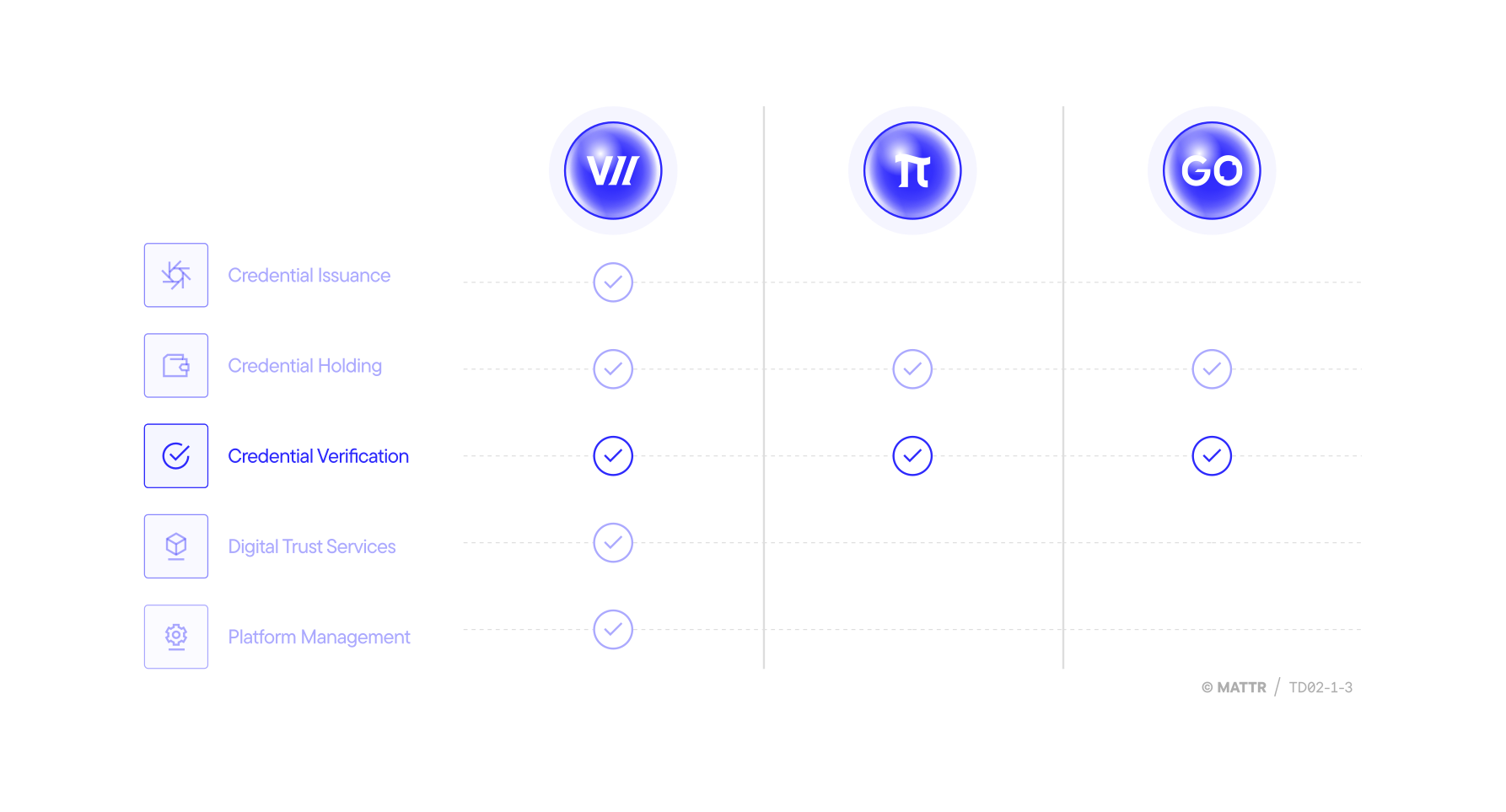
You can use different MATTR VII, MATTR Pi and/or MATTR GO capabilities to verify different credential formats based on your use case:
- MATTR VII:
- In-person verification of CWT and Semantic CWT credentials.
- Remote verification of mDocs.
- MATTR Pi:
- In-person verification of CWT and Semantic CWT credentials.
- In-person and Remote verification of mDocs.
- MATTR GO:
- In-person verification of CWT and Semantic CWT credentials and mDocs.
How would you rate this page?
Last updated on