
Embedded Web App integration pattern
mDoc/mDL acceptance is typically done as part of a wider flow that includes other checks such as document scanning, facial recognition and liveness checks.
Many of these standard identity verification checks are best performed on a mobile device due to the availability of built-in hardware like cameras and biometric sensors. Embedding the Verifier Web SDK capabilities within an existing IDV web application allows users to complete these verification steps seamlessly on their mobile devices while interacting with a single web application.
If a user starts within a desktop browser, the assumption is that the IDV web application will securely transfer the active session to their mobile device (for example, by displaying a QR code that the user scans with their mobile browser). This ensures session continuity, allowing the user to continue the verification process on their mobile device without restarting the flow.
Overview
- Verification channel: Remote, Unsupervised
- Device/s: Same-device
- Formats: mDocs
- Information assurance level: Very High
- Identity assurance level: High (exact identity assurance levels depend on specific IDV blocks implemented in the workflow).
Journey pattern

Accessing the Service
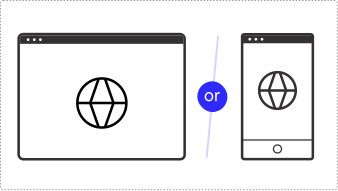
The user opens a browser on their laptop or mobile device and begins an interaction with an IDV web application.
Architecture
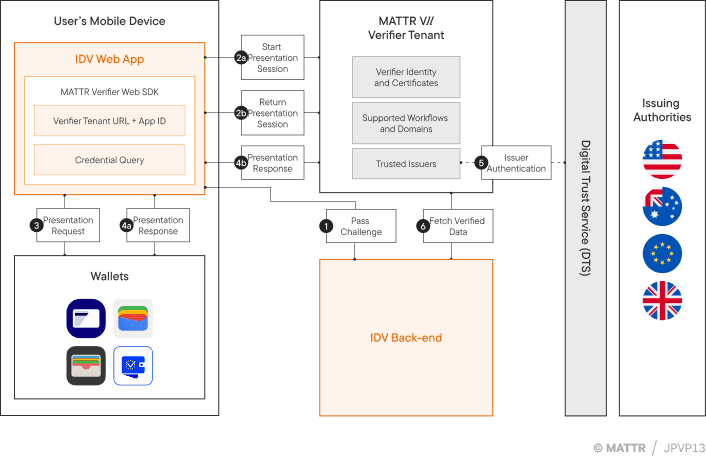
The following architecture flow assumes the user is now interacting with the IDV web application on their mobile device. They either started the session on mobile, or were transferred there from a desktop browser via a secure session handoff.
Pass Challenge
The IDV back-end server generates a unique challenge related to the specific session and passes it to the IDV web app.
Start Presentation Session
The IDV web app uses the MATTR Verifier Web SDK to start a presentation session and convert the credential query into a signed credential request.
Presentation Request
The Verifier Web SDK passes the presentation request via the web browser to the Digital Credentials API, which surfaces matching credentials and wallets to the user.
Presentation Response
The user consents to share the requested credential data, which is returned to the Verifier Web SDK which then passes it onto the MATTR VII verifier tenant for verification.
Credential Verification
The MATTR VII verifier tenant verifies the credential presentation, including checking its digital signature against a list of trusted issuers.
Once verification is completed, the verifier tenant informs the Verifier Web SDK that verification results are available.
Fetch Verified Data
The IDV backend server uses the session ID and challenge to securely fetch the verified data from the MATTR VII tenant. The IDV backend can then pass verification results to the IDV web app, and continue the journey as needed.
Detailed Journey flow
The following journey begins when the options for the user to verify using an mDL is surfaced via the IDV application:
- The IDV Web App initializes the Verifier Web SDK to prepare for credential verification.
- As part of the IDV verification workflow, the user selects to verify their identity using an mDL.
- The IDV Web App requests a unique challenge from the IDV Backend. This challenge will be used later to correlate the verification session.
- The IDV Backend generates and returns a unique challenge to the IDV Web App.
- The IDV Web App instructs the Verifier Web SDK to request credentials from the user.
- The Verifier Web SDK requests the MATTR VII Verifier Tenant to create a new presentation session, using the unique challenge.
- The MATTR VII Verifier Tenant generates and returns a presentation request to the Verifier Web SDK.
- The Verifier Web SDK uses the presentation request to invoke the browser's Digital Credentials API to surface available credentials.
- The Digital Credentials API presents matching credentials to the user.
- The user selects which mDL credential they wish to share.
- The user's wallet displays the detailed request information and asks for consent.
- The user reviews the request and provides explicit consent to share the requested information from their credential.
- The user's wallet sends the encrypted credential response to the Verifier Web SDK.
- The Verifier Web SDK forwards the credential response to the MATTR VII Verifier Tenant.
- The MATTR VII Verifier Tenant decrypts the response and verifies the authenticity of the credential, including checks such as signature validation, revocation status and the identity of the issuer.
- The MATTR VII Verifier Tenant returns a session ID to the Verifier Web SDK.
- The Verifier Web SDK informs the IDV Web App that verification results are ready.
- The IDV Web App requests the verification results from the IDV Backend.
- The IDV Backend retrieves the results from the MATTR VII Verifier Tenant using the session ID and challenge. This request is made via a secure server-to-server connection.
- The MATTR VII Verifier Tenant returns the verification results to the IDV Backend.
- The IDV Backend forwards the verification results to the IDV Web App. The IDV Web App can now correlate these results with the original challenge to ensure integrity.
- The IDV Web App allows the user to proceed with any additional verification steps or complete the verification flow.
If the user started on a different device, the assumption is that the IDV web app will inform the original browser session so the user can pick-up where they started.
How would you rate this page?
Last updated on