
Remote web verification DC API journey pattern
This journey pattern is used to verify an mDoc remotely via an online verification workflow, as per ISO/IEC 18013-7:2025 using the DC API.
Overview
- Issuance channel: Remote, unsupervised
- Device/s: Same-device / Cross-device
- Formats: mDocs
- Information assurance level: High
- Identity assurance level: High
Journey flow

Visiting a web application
The user opens a web application in a browser on their laptop or mobile device. They begin an interaction that requires identity verification.
Architecture
Interacting with the verifier application
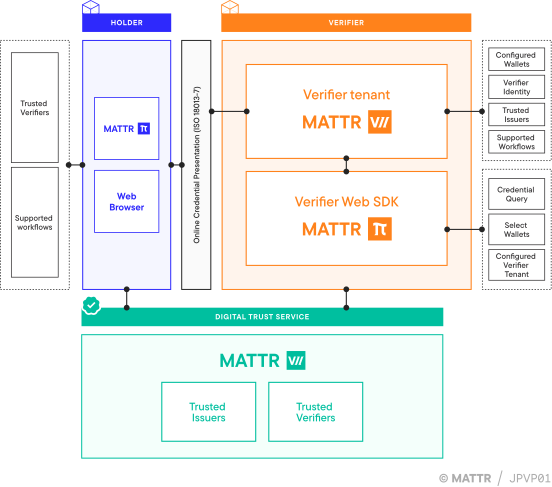
The user accesses a verifier web application using a supported web browser, on either a desktop or a mobile device.
Requesting a credential for verification
Within the verifier application, the user initiates an interaction that requires presenting a mobile document (mDoc) for verification.
The verifier application embeds the MATTR Verifier Web SDK and first checks whether the user’s browser supports the Digital Credentials API (DC API). If supported, the verifier application uses the SDK to initiate a presentation session with a configured MATTR VII verifier tenant.
The request sent to the MATTR VII verifier tenant specifies:
- Which credentials are required
- Which claims from those credentials are needed for verification
The MATTR VII verifier tenant creates a new presentation session and returns a verification request object to the verifier application.
Invoking the Digital Credentials API
The verifier application passes the verification request object to the browser to invoke the Digital Credentials API.
Based on the user’s device and environment, the browser presents an appropriate verification interface to the user:
- On desktop devices, this may be rendered as a QR code
- On mobile devices, this may be rendered as an in-browser control (for example, a button) to start the verification directly
The user initiates the verification process by scanning the QR code or interacting with the in-browser control.
Selecting and reviewing a credential
Once initiated, the browser forwards the verification request to the user’s mobile device.
The mobile operating system displays a system-managed interface listing matching credentials available from installed wallet applications that are registered to handle DC API requests. This interface is rendered by the mobile device and appears on top of the web browser.
The user selects a credential to present.
- On some platforms (for example, iOS), if only one compatible wallet holds a matching credential, the operating system may directly open that wallet without showing a selection interface.
Invoking the wallet application
The wallet application authenticates the user and retrieves the verification request details, including:
- Which credential is being requested
- Which claims are required
- The relying party requesting the information
The wallet application displays the credential details to the user for review. This interface is rendered by the wallet application and is displayed on top of the web browser.
The user reviews the request and, if comfortable, provides consent to share the credential.
Verifying the credential
After consent is given, the wallet application returns an encrypted presentation response to the browser.
The browser forwards this presentation response to the verifier application, which then submits it to the MATTR VII verifier tenant.
The MATTR VII verifier tenant decrypts and verifies the presentation, performing checks to ensure:
- The credential has not been tampered with
- The credential has not been revoked
- The credential has not expired
- The credential was issued by a trusted issuer
Displaying verification results
The MATTR VII verifier tenant returns the verification results to the verifier application.
The verifier application displays the results to the user, allowing them to continue their interaction based on the outcome of the verification.
The MATTR VII verifier tenant can also be configured to return the verification result to a secure back-end service instead of the front-end, depending on implementation needs.
How would you rate this page?
Last updated on